Try our new research platform with insights from 80,000+ expert users
PeerSpot user
Pre-Sales Engineer at a tech services company with 51-200 employees
Consultant
Feb 16, 2016
Open APIs allow seamless integration with other products.
Pros and Cons
  • "With Lastline, the effort to put in into the protecting the users against zero-day threats and malware can be subsequently reduced."
  • "Lastline is not a cheap product if compared with their competitors."

What is most valuable?

Open APIs allow seamless integration with other products. Eventhough Lastline does not provide an end-to-end solution like their rivals, namely McAfee, TrendMicro and Symantec, Lastline excels by providing their APIs so that they could be integrated with other security products.

How has it helped my organization?

With Lastline, the effort to put in into the protecting the users against zero-day threats and malware can be subsequently reduced. It's accuracy and analysis reports on the objects are what all the other vendors should make an example of.

What needs improvement?

Lastline's reports can sometimes be very complicated and somehow leaves users with lots of technical information that cannot be easily digested. A more presentable reporting should be provided. However, this is not a weakness and their reporting is only suitable for people with certain technical knowledge.

Lastline itself is a complicated product to navigate through, although it provides a lot of details to the users. This was a feedback from one of our customer here during the POC stage. Users may be required to be technically sound to understand what Lastline has provided to them. What I mean by "a more presentable reporting" is that Lastline should provide a more user readable format of the report; perhaps more visual storyline of their process?

For how long have I used the solution?

I have been using and performing POC on Lastline for my customers for around 1 year.

Buyer's Guide
VMware NSX
February 2026
Learn what your peers think about VMware NSX. Get advice and tips from experienced pros sharing their opinions. Updated: February 2026.
884,933 professionals have used our research since 2012.

What was my experience with deployment of the solution?

No issues.

What do I think about the stability of the solution?

No stability issues.

What do I think about the scalability of the solution?

Lastline has no issue with scalability as it is by far the more scalable amongst APT solutions.

How are customer service and support?

Customer Service:

Lastline support has yet to fully penetrate into the SEA market. Their responses may come from their Sales and System engineers instead of their support team.

Technical Support:

As mentioned, their system engineers are very well trained and experience enough to answer most of the technical and product inquiries thrown at them.

Which solution did I use previously and why did I switch?

No.

How was the initial setup?

Initial setup is very straightforward for cloud-based deployment. For on-premise deployment, it will require some UNIX-based commands knowledge.

What's my experience with pricing, setup cost, and licensing?

Lastline is not a cheap product if compared with their competitors. I wish they could do something about the pricing as it is very hard to convince the customers on such a model.

Disclosure: My company has a business relationship with this vendor other than being a customer. I have evaluated, tested and perform proof of concepts for our customers.
PeerSpot user
it_user234747 - PeerSpot reviewer
Practice Manager - Cloud, Automation & DevOps at a tech services company with 501-1,000 employees
Real User
May 7, 2015
NSX for vSphere vs. NSX Multi-Hypervisor

Originally posted at vcdx133.com.

This post provides a Tech101 breakdown of VMware NSX. If you have heard the buzz-word “NSX” or “Network Virtualisation” and want to learn more about it, this post is for you.

VMware NSX has two distinct variantsNSX for vSphere (NSX-v) and NSX Multi-Hypervisor (NSX-MH). The most feature rich version is NSX-v (as you would expect) and the most flexible and vendor agnostic is NSX-MH (albeit with less features). Currently these are separate binaries that you download and deploy, however there is talk that in the future it will be a single binary set with a V/MH software setting during deployment.

A little bit of history will also clarify things. VMware acquired Nicira in 2012 and integrated/developed the NSX product suite by combining VMware’s vCNS (aka vShield Edge and App) with Nicira’s NVP. So if you understand vShield, it will give you a good start to mastering NSX.

The diagram below illustrates the NSX architecture, complete with physical infrastructure. Note, storage virtualisation has been deliberately left out of the diagram since it is not in-scope. The “P2V” lines denote the possible NSX overlay to physical network integrations.

NSX for vSphere (NSX-v)

NSX-v has the following components:

  • vSphere ESXi – server hypervisor.
  • vSphere Distributed Switch – the advanced Layer 2 virtual Switch that VMware provides with the Enterprise Plus licence (you cannot use the vSphere Standard Switch with NSX).
  • NSX Manager – management interface of NSX, presented via the vSphere Web Client and has a northbound NSX API.
  • NSX Controller – the control plane of NSX which also has the northbound NSX API.
  • Logical Switch – VXLAN tunnels that run across disparate networks.
  • Edge Services Gateway (ESG) – provides L3-L7 network services to the outside world.
  • Distributed Logical Router (DLR) – provides L3-L7 network services to the physical and virtual infrastructure via a hypervisor service for the data plane and a virtual appliance for the control plane.
  • Distributed Firewall – this is a service that runs on ESXi and provides micro-segmentation of virtual infrastructure
  • Third Party integrations – advanced L3-L7 services provided by Third Parties via the NSX API. eg. Palo Alto Networks, McAfee, Trend Micro, F5, Citrix, Silver Peak, etc.
  • Physical Network – traditional core, aggregate, distribution, access or Clos-type Leaf & Spine architectures
  • Virtual overlay to Physical network gateways – the NSX virtual overlay integrates with the physical world via a gateway. eg. Routing, L2 Extension, VXLAN, etc.

What are L2 to L7 services? VLAN, VXLAN tunnels, Network Firewall, IPS, Application Firewall, NAT, Routing (OSPF, BGP, IS-IS), Load Balancing, SSL VPN, IPSec VPN, Route redistribution, etc.

NSX for Multi-Hypervisor (NSX-MH)

The NSX-MH has the same functional components, except it uses Open vSwitch (instead of vDS) with KVM, Hyper-V or XenServer and does not have a Distributed Firewall (no micro-segmentation).

Why do it this way?

You may have heard about the “Goldilocks zone” (not too hot, not too cold, just right – used to describe Earth’s placement in the solar system for sustaining life). The hypervisor is the “Goldilocks zone” of the Data Center, it is the natural meeting place for the Software Defined Data Center (SDDC) – Compute, Network and Storage.

If you understand the benefits of server virtualisation with vSphere (abstraction of the Operating System from the hardware, etc.), you can apply the same logic to network virtualisation. There is also the driving force of creating blueprints within the Service Catalogue of the Cloud Management Platform and linking polices (compute, network, storage and security) to the blueprint.

Weaknesses

  • The biggest weakness of NSX – no associated hardware, since VMware is a software company, is also its greatest strength. You can run NSX across any physical network (as long as it meets the fundamental requirements of scalability, performance and reliability) and use it to connect disparate networks together.
  • Because NSX is software, it cannot match dedicated physical hardware in terms of performance, however this weakness is balanced with flexibility and scale. Ensure that your SDDC is designed to match your business requirements – this way the risk of lack of performance is mitigated.
  • NSX on its own is not the greatest use-case, you really want to use it to complete your SDDC solution (ie. Cloud Management Platform, Compute Virtualisation, Network Virtualisation, Storage Virtualisation and Service Catalogue).
Disclosure: My company does not have a business relationship with this vendor other than being a customer.
PeerSpot user
Buyer's Guide
VMware NSX
February 2026
Learn what your peers think about VMware NSX. Get advice and tips from experienced pros sharing their opinions. Updated: February 2026.
884,933 professionals have used our research since 2012.
PeerSpot user
Owner at David Strom Inc.
Writer
Top 20Leaderboard
Dec 10, 2014
A better way to do breach detection using advanced sandboxing methods
Pros and Cons
  • "What makes them unique is their range of discovery, the way they can effectively mimic actual PC or smartphone endpoints to examine malware behavior."
  • "It is a bit tricky to install the various components and to get it set up properly."

What is most valuable?

The Internet is a nasty place, and getting nastier. Current breach detection products using traditional anti-malware sandbox technologies can’t keep up with advanced persistent and hyper-evasive threats that pummel enterprise networks on an hourly basis. Malware authors encode their exploits with a number of operational vectors, so in case one entry point doesn’t work they can still find a way into your network to do their dirty work. And as more businesses hire more outsourced consultants, part-time workers, and employ mobile devices, they open up additional mechanisms for malware to enter their corporate networks.

Some traditional AV and endpoint protection vendors have responded to these threats by adding features to their security products to do a better job of anticipating badly behaving packets coming through their detectors. They make use of limited virtual machines or operating system emulators to view how a piece of malware operates. That is great, but it isn’t enough. Many malware authors can detect when these simulated environments are active and can evade detection accordingly. For example, some exploits such as W32.DelfInj can literally go to sleep for several days to avoid any detector that will just scan an infected system for the first several minutes.

1aWhat is needed is a next-generation sandbox that can correlate a series of particular breach events add IP and object based reputation analysis and do this in near real-time. This is what the Lastline Breach Detection Platform does. What makes them unique is their range of discovery, the way they can effectively mimic actual PC or smartphone endpoints to examine malware behavior.

Download my full review of their system here.

How has it helped my organization?

Lastline has four major components:

  • Network sensors. Lots of security tools have sensors, and certainly this is the cornerstone of any modern security tool. What makes Lastline more interesting is that it combines IP and domain reputation analysis with malware fingerprinting techniques. 
  • Advanced sandbox screening tool. Suspicious objects that are suspected to be zero-day threats are collected from the sensors and analyzed with the Lastline next-generation sandbox, which emulates a complete endpoint system (OS, memory, and peripherals). Other sandboxing tools leave small in-guest code stubs that can reveal they aren’t “real” endpoints; Lastline doesn’t have these clues for malware to key into and looks just like regular computers. 
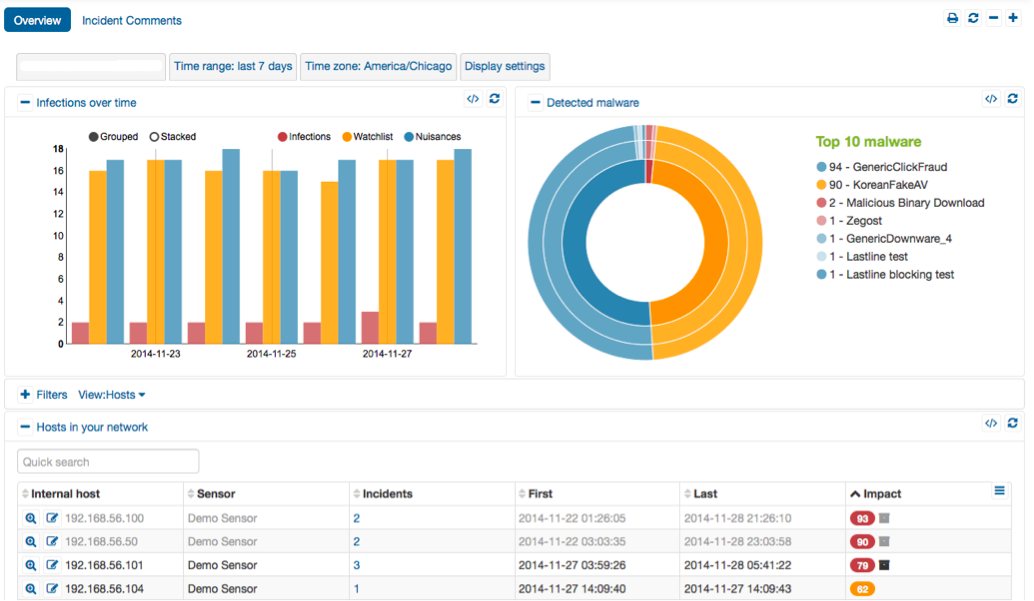
  • Reporting and threat analysis tool. Low-level event data is then collected and correlated into a particular security incident, which then updates an online threat database. For example, just by clicking on a few different menu items, we can see how often the same infection was downloaded by a particular endpoint, or why a particular event led to other activities across our network, or how a piece of malware was attached to a series of different email messages.
  • Rich threat intelligence of advanced threats.Known exploits and IP based systems associatedwith advanced malware are highly dynamic and traditional signature-based knowledge bases are ill equipped to keep up. Lastline threat intelligence draws on its global collection of next-generation sandboxes.

What needs improvement?

They just announced added Mac OS X support, which I didn't get to test. 

What was my experience with deployment of the solution?

It is a bit tricky to install the various components and to get it set up properly. But once you do, you can take full advantage of its features. 

What do I think about the stability of the solution?

No.

What do I think about the scalability of the solution?

No, indeed this is one of its main benefits. You can scale it up to handle very large networks with their modular and SaaS-based tools. 

To add flexibility to its system, both the next-generation sandbox and reporting tool can be either hosted or installed on-premises.

Which solution did I use previously and why did I switch?

Their core idea is to run a piece of suspected malware in such a way as to provide the ultimate examination of its operations. Suspected code is extracted from the network traffic flow, analyzed andcorrelated with other network-level events to provide a full picture of what happened. It has one of the most throughout analysis sandbox engines. But what is more important is how they are able to provide actionable intelligence to a wide variety of leading security vendors’ intrusion prevention and unified threat management platforms from WatchGuard, Barracuda, TippingPoint, Juniper, Tripwire and others. Through a combination of application programming interfaces, Lastline can send and receive firewall blocking rules and breach event data to/from the appropriate systems that you have already purchased, so that these threats can be quickly stopped.

Yes, there are other sandboxing securing tools out there, but they aren't as thorough as what Lastline does.

What about the implementation team?

Vendor team was first rate.

Disclosure: My company does not have a business relationship with this vendor other than being a customer.
PeerSpot user
Buyer's Guide
Download our free VMware NSX Report and get advice and tips from experienced pros sharing their opinions.
Updated: February 2026
Buyer's Guide
Download our free VMware NSX Report and get advice and tips from experienced pros sharing their opinions.