No more typing reviews! Try our Samantha, our new voice AI agent.
reviewer1274394 - PeerSpot reviewer
Head Of Engineering at a sports company with 11-50 employees
Real User
Oct 28, 2020
An easy-to-use container-based cloud Platform
Pros and Cons
  • "Thanks to Heroku, we don't need to do as much direct management in AWS."
  • "They solve most of our problems and we don't experience many issues with them."
  • "They could flesh out some of their analytics a little more."
  • "Heroku is pretty stable. We experience the occasional outages."

What is our primary use case?

We deploy a lot of our production servers on Heroku. We use it for deploying production apps to AWS.

Within our organization, there are roughly seven people using this solution — mostly software engineers and QA engineers. 

How has it helped my organization?

Thanks to Heroku, we don't need to do as much direct management in AWS.

What is most valuable?

Ease of administration, ease of publishing, and deploying apps are all great. 

What needs improvement?

They could flesh out some of their analytics a little more.

I can't think of any areas for improvement. It works pretty well.

Buyer's Guide
Heroku
June 2026
Learn what your peers think about Heroku. Get advice and tips from experienced pros sharing their opinions. Updated: June 2026.
900,644 professionals have used our research since 2012.

For how long have I used the solution?

I have been using this solution for roughly six years.

What do I think about the stability of the solution?

Heroku is pretty stable. We experience the occasional outages. It's on top of AWS, so anytime they have problems it affects Heroku. It's about as much uptime as AWS, maybe a little less, because they then have their own additional infrastructure on top of that.

What do I think about the scalability of the solution?

Scalability-wise, it's good. It's pretty easy to scale manually or dynamically.

How are customer service and support?

The technical support is pretty good. We haven't experienced many issues.

Which solution did I use previously and why did I switch?

Before Heroku, we were just using straight AWS — for ease of management. 

How was the initial setup?

The initial setup was pretty straightforward.

What other advice do I have?

On a scale from one to ten, I would give Heroku a rating of nine. It's not amazing but it's pretty good. They solve most of our problems and we don't experience many issues with them. A little bit of downtime, but that's about it. 

I'd recommend Heroku. I think it's worth it. If you don't want to roll out of your own AWS management infrastructure, I think it's a good option.

Which deployment model are you using for this solution?

Public Cloud
Disclosure: My company does not have a business relationship with this vendor other than being a customer.
PeerSpot user
it_user701415 - PeerSpot reviewer
Tech Lead Javascript Full Stack at a tech services company
Consultant
Jul 15, 2017
It has improved our deployment speed without requiring time to configure some servers
Pros and Cons
  • "Valuable for us was the fast deployment. This means the time to market is improved without pain for developers."
  • "We don't find the pipelines intuitive. The user experience could be better. Having to set up multiple apps, then a pipeline, seems like an overkill on the amount of work to do."

What is most valuable?

Valuable for us was the fast deployment. This means the time to market is improved without pain for developers.

How has it helped my organization?

It has improved our deployment speed without requiring time to configure some servers.

What needs improvement?

We don't find the pipelines intuitive. The user experience could be better. Having to set up multiple apps, then a pipeline, seems like an overkill on the amount of work to do.

For how long have I used the solution?

We have been using the solution for six months.

What do I think about the stability of the solution?

We did not encounter any issues with stability.

What do I think about the scalability of the solution?

We did not encounter any issues with scalability.

How are customer service and technical support?

We didn't need to use the technical support.

Which solution did I use previously and why did I switch?

We did not use a previous solution.

How was the initial setup?

The initial setup was straightforward.

Which other solutions did I evaluate?

We evaluated Google Compute Engine, Google App Engine, and Kubernetes.

What other advice do I have?

It's an easy product to use.

Disclosure: My company does not have a business relationship with this vendor other than being a customer.
PeerSpot user
Buyer's Guide
Heroku
June 2026
Learn what your peers think about Heroku. Get advice and tips from experienced pros sharing their opinions. Updated: June 2026.
900,644 professionals have used our research since 2012.
PeerSpot user
Full Stack Web Developper, Freelance & Entrepreneur at a tech services company with 51-200 employees
Consultant
Jun 22, 2016
My story about going from being a fan of Heroku to leaving Heroku
Pros and Cons
  • "I have been a great fan of Heroku as it simplified my work for many years."
  • "But I recently got my account suspended because someone abused one of my apps."

I have been a great fan of Heroku as it simplified my work for many years.

But I recently got my account suspended because someone abused one of my apps. Since then, I decided to leave Heroku because I cannot afford to loose control on my work.

Here's the story: http://augustin-riedinger.fr/e...

Disclosure: My company does not have a business relationship with this vendor other than being a customer.
PeerSpot user
PeerSpot user
Senior Programmer at a tech services company with 51-200 employees
Consultant
Top 20
Sep 7, 2015
We can configure and start using it easily, but the pricing is a little high and the support could be better.
Pros and Cons
  • "We, as a startup, can use Heroku and the plenty of possible configurations to scale from the very beginning to a medium-sized company."
  • "It's pricing is a little high and could be lowered."

Valuable Features:

It's easy to configure and to start using.

Improvements to My Organization:

We, as a startup, can use Heroku and the plenty of possible configurations to scale from the very beginning to a medium-sized company.

Room for Improvement:

It's pricing is a little high and could be lowered.

Also, support could be better.

Disclosure: My company does not have a business relationship with this vendor other than being a customer.
PeerSpot user
PeerSpot user
Developer at a tech services company with 1,001-5,000 employees
Consultant
Dec 23, 2014
Good host for nodejs, but not the cheapest solution
Pros and Cons
  • "Deploying with git, npm install git hook ... basically, they got it right for nodejs servers hosting."
  • "Plugins aren't cheap (Mailchimp is $1.5/1000 emails)."

What is most valuable?

Deploying with git, npm install git hook ... basically, they got it right for nodejs servers hosting. Free trials is limited (1 app running at a time) but good enough for a proof of concept. Using an Heroku backend and a GithHub pages front end serving static content, I can scale my app for free to a reasonable level.

What needs improvement?

Plugins aren't cheap (Mailchimp is $1.5/1000 emails).

For how long have I used the solution?

6 months

How are customer service and technical support?

The doc is good, for nodejs at least. It is newbies friendly.

Which solution did I use previously and why did I switch?

I rejected Google app engine for there lack of nodejs support, and AWS for the complexity of setting up a simple app.

How was the initial setup?

The CLI tools are good and deployment is quick. The web control panel ain't that great, I got into trouble trying to launch my app.

What's my experience with pricing, setup cost, and licensing?

0 for now :)

Disclosure: My company does not have a business relationship with this vendor other than being a customer.
PeerSpot user
it_user154575 - PeerSpot reviewer
it_user154575IT Manager at a wellness & fitness company
Vendor

Heroku's support is very poor.

PeerSpot user
CEO at a tech services company with 51-200 employees
Consultant
Nov 4, 2014
Amazing platform, poor customer service
Pros and Cons
  • "Lots of integrations"
  • "I had an issue recently where my site was down intermittently for unknown reasons. I posted a ticket and 5 days have gone by without any resolution."

Valuable Features

Lots of integrations

Use of Solution

1 year

Stability Issues

I had an issue recently where my site was down intermittently for unknown reasons. I posted a ticket and 5 days have gone by without any resolution. I'm surprised at this total lack of customer service.

Customer Service and Technical Support

Customer Service:

So far very very poor. I'm considering switching to another platform for only this reason. How can a startup scale a business with such poor support. 5+ days no response to a valid ticket!

Technical Support:

Horrible because they take forever to respond. Days with no response.

Initial Setup

The setup was pretty good.

Disclosure: My company does not have a business relationship with this vendor other than being a customer.
PeerSpot user
PeerSpot user
Engineer at a tech services company with 51-200 employees
Consultant
Dec 4, 2013
Some insights into PaaS market

Platform as a Service is a one of the GROWING sector of cloud computing. PaaS basically help developer to speed the development of app, saving money and most important innovating their applications and business instead of setting up configurations and managing things like servers and databases.

Other features buying to use PaaS is the application deployment process such as agility, High Availability, Monitoring, Scale / Descale, limited need for expertise, easy deployment, and reduced cost and development time.
Major forces driving the PaaS

- Pay as you Go
- Low start up cost
- Leave the plumbing to expert
- PaaS handles auto scaling/descaling, Load blancing, disaster recovery
- PaaS manages all security requirements
- PaaS manages reliability, High Availability
- Paas manages manay third party addon’s for you

Barrier to PaaS adoption?

- Less Control over Server and databases
- Have to be expert to mange security controls and audits
- Costs will be very high if not governed properly
- Premature and dobious in current day and age

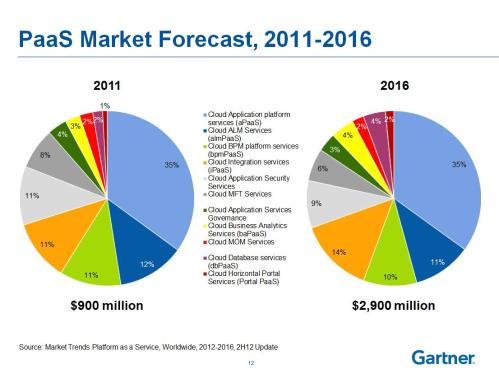
Major PaaS providers are Heroku, Jelastic, and Engine Yard. When we talk about revenue, The global PaaS market is estimated to grow from $1.28 billion in 2013 to $6.94 billion in 2018 at a compound annual growth rate (CAGR) of 32.54% in this period. In terms of geographies, North America continues to be the biggest market for PaaS solutions. In 2012, PaaS revenues ($1.2 billion) was the tenth of the size of SaaS ($14.4 billion), a fifth of IaaS ($6.2 billion), and just a tiny fraction of BPaaS ($84.1 billion).

PaaS has always taken a very small space in the cloud computing arena as compared to the other two segments: IaaS and SaaS. But the trend has recently shown a drift with PaaS market showing a very high growth rate in terms of revenue. Though it is still not as huge as the other two segments but now holds a significant proportion of the pie. PaaS has now been adopted by most of the big cloud computing and IT solution providers like Amazon, IBM, Google etc. as one of their main services.. Many small players have also emerged and made the market very dynamic and competitive. Application developers are benefiting from this fact resulting in more adoption and thus increasing the demand for PaaS all the more in various sectors.

We expect to see more and more application development companies choosing PaaS over IaaS or traditional Hosting, as they can then focus on driving innovation and building apps that change their interactions with customers, partners and community. It will make them free of the details of infrastructure, so they can push the possibilities of the latest technology to build great web and mobile applications.


Disclosure: My company does not have a business relationship with this vendor other than being a customer.
PeerSpot user
it_user105252 - PeerSpot reviewer
it_user105252CTO at a healthcare company with 51-200 employees
Top 20Vendor

I don't see how the "barriers" are inherent to PaaS:
-->Managing servers is a cost TO BE AVOIDED - so that's actually a benefit of PaaS not a barrier
--> Security is no more difficult than implementing good security practices on a Web App. And much of it is simpler since you don't have to figure out how to optimally configure your Web Server, your Platform server (OS) and your middle ware server for optimal security. you only have to deal with App level and data level security.
-->Costs are inherently LOWER than with VMs since you do not have to have staff managing the VM stack and scaleout is easier to implement so you can start with a smaller instance
--> As for premature.... based on?

it_user9303 - PeerSpot reviewer
Engineer at a tech vendor with 51-200 employees
Vendor
Sep 1, 2013
All That Cloud: Amazon, Google App Engine, Windows Azure, Heroku, Jelastic

You wanna be in the cloud? You have plenty of options. I’ve evaluated or used many of them, so here are a few words about each. (I will include some Java-related comments, as I’m using Java, but most of the things apply to all (supported) languages). But before I go into a bit more details for each service, let me summarize what “the cloud” actually means when it comes to hosting your applications:


  • auto-scaling – if there is an increased demand, you automatically get more resources (more virtual machines in most cases) to handle the requests. For the regular application this is rarely useful, but it’s nice to have it and be sure that your service never dies because the load is too high

  • pay what you use – simply put, this is in fact the option to choose small servers when you are small, and bigger servers when you are big. The “cloudy” thing here is that you can do that easily, rather than reconfiguring some remote machines

  • cloud infrastructure – this is fancy talk for “we deploy these services and take care that they are working”. So instead of installing and configuring a message queue on your machines, you hook up to an already installed and managed message queue. Or database, email service, or cache.

  • management tools – you get consoles, command-line tools and web UIs for handling your installations. This is both a plus (the tools are higher level than working with native commands), and a minus (there’s a learning curve)

  • load balancers – all services offer these, and you rarely care what’s the software and hardware of the load balancer

The overall plus is the ease of use – you need way less system administration knowledge, and even if you have it, you need to do much less in order to have a real-world-ready application. It is not necessarily cheaper than regular servers (actually, it might be more expensive). But let’s see what each service does:

Amazon Web Services (AWS). This is the most popular option.


  • General flow: you create an EC2 instance, which is a virtual machines, ssh to it and have full control. You can bring up and kill copies of your instance whenever there’s higher load.

  • Flexibility: since you have root control over your machine, it is very flexible.

  • Usability: the AWS console and the Elastic Beanstalk give you very nice UI for managing applications. With Beanstalk you can deploy applications without even opening a console, just drop a war file. In reality you will at least need to provide some configuration though. The best thing is having predefined instance images, so you can have “Tomcat with MySQL” up and running within a minute. There are already nice solutions built ontop of the Amazon API, like RightScale.

  • Features: in addition to the basic instance functionality, you have a lot of extras – managed database, elastic IPs, DNS, cloud storage, CDN, mail service, message queue, cache (this one is not that good, btw), etc. So instead of installing and managing these services on your instances, you can use the Amazon versions.

  • Pricing – you are charged for the number of hours your instances are running

  • Trial: yes, 1 year (a micro instance).

Google App Engine (GAE). This is a PaaS (Platform as a Service), so you don’t get your own virtual machines and are limited in the use of some standard APIs (for example, you can’t spawn threads), and you can’t use a file system (you need the Blobstore API instead)


  • General flow: you create an application and deploy it (through command line or IDE plugin). You don’t manage servers and you don’t have ssh – you have just the app. The app runs in a sandbox, and you may need to use some proprietary APIs in order to store to a NoSQL store, use MapReduce, etc. You have less control. You can browse the datastore, view log files and performance metrics via the admin UI, as you don’t have regular access to the target “machine”

  • Flexibility: low – you deploy to a sandbox. You are limited to the configurations the admin UI offers you

  • Usability: the admin UI is OK (not perfect, but I can’t say something bad)

  • Features: fewer extras, but still good ones – email, datastore, task queue, memcached, etc.

  • Pricing – generally, you are charged for the amount of resources you are consuming

  • Trial: yes, its is free as long as you use small amount of resources

Windows Azure. You get virtual machines, you can use remote desktop / ssh to administer them.


  • General flow: you create a virtual machine and that’s it (similar to AWS). You can also deploy simple web sites using php, asp or node.js (which is PaaS, similar to GAE)

  • Flexibility: high for the VM, low for the PaaS

  • Usability: the admin UI is OK

  • Features: caching, database, service bus

  • Pricing – fine-grained, pay-as-you-go or prepaid plans

  • Trial: yes, 2 months (the smallest virtual machine)

Heroku. Platform as a Service – you deploy an app in a sandbox and have a lot of useful add-ons for other services. You have two types of “dyno” – one that services web requests, and one that services background requests.


  • General flow: you download the heroku toolbelt, run it (the latest version fails on Windows though – it installs ruby 1.9.2 and requires 1.9.3, so you have to edit the bat file) and then use it to create and deploy applications

  • Flexibility: low, because you run in a sandbox, but each add-on is configurable and there are a lot of add-ons, so it’s better than other PaaS options. The bad news for Java developers is that it only supports deployment by checking out from git, and building with maven. No other version control system or build tool. (there is hg-git adapter, which you can try if using mercurial, but it starts getting hacky)

  • Usability: there is a need for command-line work, which is not that usable. The web UI is OK.

  • Features: most of the things you can imagine are available as add-ons

  • Pricing – you pay per dyno, per database and per add-on (if paid)

  • Trial: yes, you get 750 hours monthly for free – this means you get it for free if you have low usage

Jelastic. Platform as a Service for Java only – you deploy an app in a sandbox. You can configure the architecture and use various 3rd party services. It’s not as popular as the other services, but I got an app running quickly (with some useful input from their support)


  • General flow: you create an application, choose an architecture via a nice UI (it’s reconfigurable later), and then deploy your war file. You configure the maximum number of servers that you want your application to use. Everything is configured with the web UI

  • Flexibility: low, because you can’t ssh to the machine. However, you are free to edit some application server configurations and have a limited, but sufficient access to the file system, you also can configure each of the additional services you use (databases, for example)

  • Usability: the interface is pretty good (I’d say better than the rest)

  • Features: you can use additional services – MySQL, MongoDB, CouchDB, memcached, building with maven. (The list is way smaller than what Heroku offers)

  • Pricing – you pay per application server instance and per additional service (MySQL, SSL, load balancer, etc.)

  • Trial: yes but just 2 weeks

There are many other options, notable RackSpace, which is a traditional hosting company, and the cloud options are simply virtual machines with some “cloudy” features, like auto-scaling. I listed only the popular options that I’ve actually tried (I’ve used AWS, GAE extensively, and deployed sample applications on the other three). The evaluation above does not aim to be complete, and I’ve certainly missed some points here and there.

There’s no “winner” – use different options for different scenarios. But it’s good to know what limitations are imposed by each service, and what’s the approach and general mindset. Because, especially with platforms like Heroku and GAE, you need to change the way you think about deployment.

Disclosure: My company does not have a business relationship with this vendor other than being a customer.
PeerSpot user
it_user232497 - PeerSpot reviewer
it_user232497Americas Cloud Ecosystem & Partnerships at a tech company with 10,001+ employees
Vendor

All... might be useful to update as many of these details are now invalid.

See all 6 comments
it_user8391 - PeerSpot reviewer
Engineer at a computer software company with 51-200 employees
Vendor
Aug 6, 2013
Easy Postgres Backup/Restore from Heroku with PGBackups and Rake

Most of my projects lately have been deployed on Heroku. They’ve developed a really nice set of tools to get your Rails (and other) apps from a git repo out into the world. They do really smart things regarding database connections to make things easy to push live. If you follow the standard setup, you’ll be running on Postgres hosted at Heroku.

Often, we want to take data that may be out on a live app (staging or production level) and setup a development machine to have that data. For complex data models and complex data setups, this can be the only way to debug issues that may not have been covered by standard unit/integration tests. With PGBackups, a heroku add-on, and a couple small Rake tasks, this is a snap.

Read the rest of this post here:
http://rcode5.wordpress.com/2013/06/30/easy-postgres-backuprestore-from-heroku-with-pgbackups-and-rake/

Disclosure: My company does not have a business relationship with this vendor other than being a customer.
PeerSpot user
it_user8373 - PeerSpot reviewer
Developer at a tech services company with 51-200 employees
Consultant
Aug 5, 2013
Great Deployment Options - Heroku, Engine Yard and Amazon

Depending on your needs heroku might get you very far, very fast. I like to use it for clients whose biggest hurdle is not the technology, but in rapidly building a product and iterating quickly. If you already know your customer base, your eventual architecture, and how big your app is going to get, you might prefer to jump ahead to engine yard or amazon, but if you are launching a new app and are still in the process of discovery and exploration, you may find heroku is a good place to start. I work with a lot of small startups and prototype apps, and I think heroku is great for that. Its easy to launch an app quickly, engage users, add new features, scale it up and down as needed, lots of plugins to help you along, while keeping your IT costs reasonable.
Now if the app really takes off, in a sustained way (not just a press-release spike), you will have to decide what changes you want to make to the architecture, and if you have outgrown heroku. I think its great to have Heroku, EngineYard, and Amazon as deployment options. They all have great free options, and each of them has their sweet spot.

Disclosure: My company does not have a business relationship with this vendor other than being a customer.
PeerSpot user
it_user4401 - PeerSpot reviewer
it_user4401Developer at a transportation company with 1,001-5,000 employees
Vendor

On my opinion, Heroku has two main pros: speed and simplicity. Since I just want to focus on my applications, it's a convenience to have a managed platform that I can quickly push application to. I also like that it offers plugins which further simplify things like mailservers, backups, logging, etc. But, as a con, it is expensive.

Buyer's Guide
Download our free Heroku Report and get advice and tips from experienced pros sharing their opinions.
Updated: June 2026
Product Categories
PaaS Clouds
Buyer's Guide
Download our free Heroku Report and get advice and tips from experienced pros sharing their opinions.